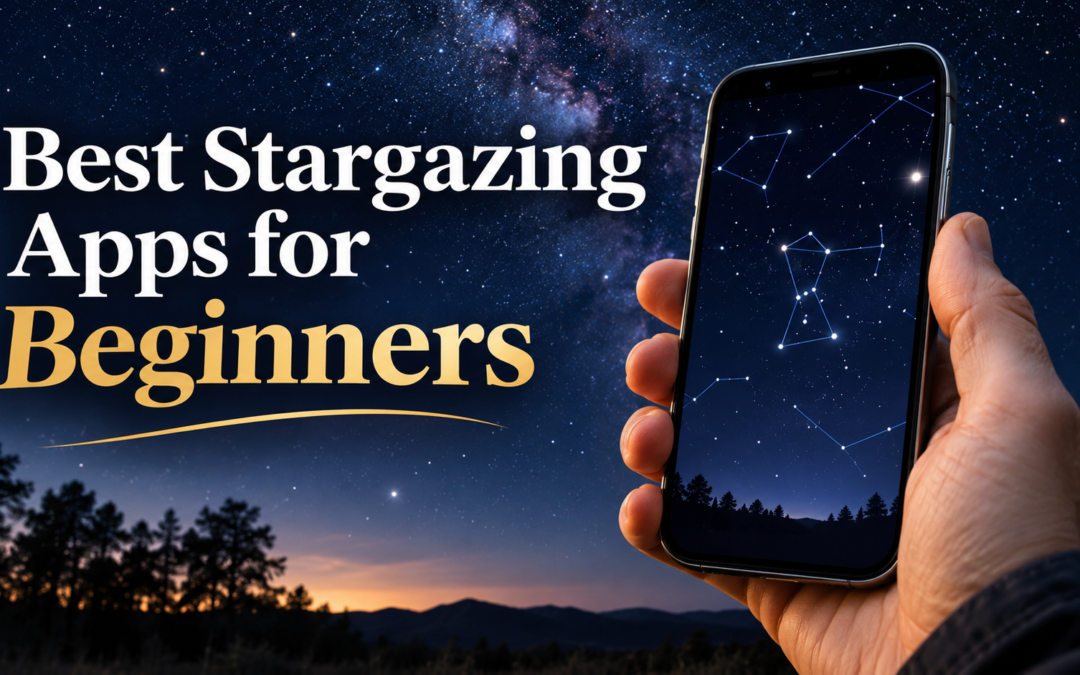
Best Stargazing Apps for Beginners
Discover the best stargazing apps for beginners, including our top pick, free options, and practical tips for identifying stars and planets.
You’re outside on a clear evening when something catches your attention. A particularly bright object sits above the horizon, and you’re wondering whether it’s a star, Jupiter, or perhaps Venus.
You could spend the next half-hour searching the internet, trying to match descriptions with what you see. Or you could open a stargazing app and know what you’re looking at within seconds.
That’s what makes these applications so useful for beginners. They help turn a sky full of unfamiliar lights into something you can begin to recognize and understand.
But with so many astronomy apps available, which one should you download first?
For most beginners, we recommend Stellarium Mobile. It provides a realistic representation of the night sky, helps you identify stars, planets, and constellations, and offers a free version with plenty to explore before you consider an upgrade.
You don’t need a telescope, previous astronomy knowledge, or a paid subscription to get started.
However, Stellarium isn’t the only worthwhile option. Some apps are particularly easy to use, others are designed for visual exploration, and some become more valuable once you own a telescope.
Let’s compare five applications, what each does well, and which one makes the most sense for you.

Stellarium App
The Five Best Stargazing Apps at a Glance
Our Top Pick — Stellarium Mobile
The one to start with
A realistic star map that follows your location, the date, and the time, whether you’re observing from Australia or the Northern Hemisphere. Use it to identify bright objects, explore nearby constellations, and gradually become familiar with the night sky.
Best for: Learning the sky and working out what you’re looking at.
Cost: Free to start, with an optional paid Plus upgrade.
On: iPhone and Android.
SkySafari — For a Telescope Owner
Best for: Planning an evening’s observing targets once you have a telescope.
Cost: Paid options; check the current editions and prices in your app store.
On: iPhone and Android.
Star Walk 2 — For Exploring With Family
Best for: A colorful, illustrated sky to share with children or grandchildren.
Cost: Free version, with optional purchases.
On: iPhone and Android.
SkyView — The Simplest One
Best for: Aiming your phone towards a bright object and finding out what it is, without needing to learn complicated controls first.
Cost: Free Lite version, with paid options.
On: iPhone and Android.
NASA App — Not a Sky Identification App
Best for: Photographs, missions and space news, once your curiosity goes beyond what you can see.
Cost: Free.
On: iPhone and Android.
Free versions, prices, and features change, and not every app is sold in every country. Check your own app store on the day you download.

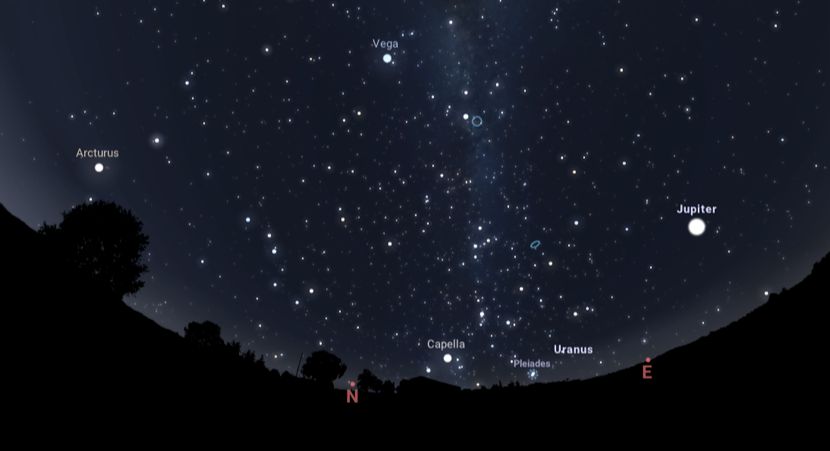
1. Stellarium Mobile — Our Top Pick Place beneath the Stellarium review heading. Stellarium Mobile star map showing stars and constellations for beginner stargazing.
1. Stellarium Mobile — Our Top Pick for Beginners
If you’re downloading your first astronomy app and aren’t sure where to begin, Stellarium Mobile is the one we’d recommend trying first.
Its greatest strength is the way it represents the night sky. Rather than overwhelming you with colorful effects or complicated controls, it provides a realistic star map that changes with your location, date, and time.
You can use it to identify bright stars, recognize constellations, locate planets, and explore objects visible through binoculars or a telescope.
It also works for observers in both the Northern and Southern Hemispheres. Whether you’re looking for Orion from Australia or trying to find the Big Dipper in North America, the app adjusts its sky simulation to your observing location.
What Makes Stellarium Useful?
Imagine noticing a bright object in the western sky shortly after sunset.
You open Stellarium, allow it to use your location, and point your phone in that direction. The app displays the surrounding star field and helps you determine whether the object could be Venus, Jupiter, or a bright star.
You can then explore the nearby constellations and gradually learn which patterns belong to that part of the sky.
That’s a valuable difference between simply identifying an object and understanding where it fits in the night sky.
Stellarium also offers a red night-mode display, which is useful for outdoor observing.
The free version is a sensible starting point. Stellarium Plus provides a larger catalog of celestial objects and additional observing features, including advanced planning and compatible telescope-control options.
Who it’s for: Beginners who want to learn what they’re seeing rather than receive an object’s name.
Our verdict: The best starting choice for most beginners because it combines straightforward sky identification with room to develop your astronomy knowledge.
2. SkySafari — Telescope Planning Place after the introduction to SkySafari. SkySafari astronomy app star chart used to plan telescope observations.
2. SkySafari — Best for Beginners Planning to Use a Telescope
SkySafari is worth considering if your interest in astronomy is developing beyond recognizing a few bright stars and planets.
It can identify objects in the sky, just as Stellarium can, but its broader appeal lies in the information and observing tools available as you gain experience.
Suppose you’ve recently bought a beginner telescope and want to know which planets, star clusters or other objects are worth observing this evening.
SkySafari can help you investigate suitable targets, understand when they’re visible and plan an observing session rather than simply stepping outside and hoping to find something interesting.
Its available features depend on the version or purchase options offered for your device. More advanced options provide extensive object catalogs and telescope-control features for compatible equipment.
That doesn’t mean a beginner needs the most expensive option.
In fact, if you’re only trying to identify the brightest objects in the sky, SkySafari may offer more functionality than you need right now.
Where SkySafari Becomes Particularly Useful
One of the early frustrations of telescope ownership is knowing what to look for.
A telescope might be capable of showing you Jupiter’s moons, Saturn’s rings, or several interesting star clusters, but that doesn’t mean those objects are equally well placed for observation every evening.
An observing app can help you choose targets that are above your horizon and well positioned when you plan to go outside.
This makes SkySafari an appealing companion as your interest grows.
Who it’s for: Beginners who own a telescope or want more detailed observing information.
Our verdict: A strong choice for someone ready to move from casual sky identification towards planning regular observing sessions.
2. SkySafari — Telescope Planning Place after the introduction to SkySafari. SkySafari astronomy app star chart used to plan telescope observations.
3. Star Walk 2 — Best for Visual Exploration and Families
Not everyone approaches astronomy wanting to study star charts or plan telescope observations.
Sometimes the appeal is simply discovering what’s above you and sharing that experience with children, grandchildren or friends.
That’s where Star Walk 2 becomes interesting.
Its colorful presentation, constellation artwork and visual explanations make exploring the sky feel approachable.
Rather than concentrating entirely on technical detail, the app places considerable emphasis on helping users enjoy the experience of discovery.
You can point your phone towards the sky, identify celestial objects, and explore information about planets, stars and constellations.
Its visual style can also keep younger observers interested as they begin recognizing familiar patterns.
Where Star Walk 2 Differs From Stellarium
Stellarium is our preference for learning the night sky’s actual appearance and arrangement.
Star Walk 2 places greater emphasis on presentation, illustrations and the experience of exploring astronomical objects.
Neither approach is inherently wrong. They suit different interests.
If you enjoy colorful graphics and interactive explanations, Star Walk 2 may be more engaging. If your main goal is to learn to recognize the stars overhead, we’d start with Stellarium.
Who it’s for: Casual stargazers, families and beginners who enjoy visual explanations.
Our verdict: An engaging alternative for people who want astronomy to feel more like an enjoyable exploration than a technical lesson.
SkyView Lite makes stargazing easier by helping beginners identify stars, planets and constellations simply by pointing their smartphone towards the night sky.
4. SkyView — Best for Simple Point-and-Identify Stargazing
Some beginners don’t want detailed observing plans, enormous star catalogs, or a collection of advanced settings.
They want to point their phone at a bright object and discover what it is.
SkyView is designed around that straightforward experience.
Using your phone’s sensors and camera-based display, it overlays astronomical information onto the direction you’re looking.
You can explore stars, planets, and constellations without first learning how to navigate a traditional star chart.
For someone who has never used an astronomy app, this immediate visual feedback can make the first experience less intimidating.
Is SkyView Enough for a Beginner?
For casual identification, it may be all you need.
If your main interest is finding which planet is shining above your house or identifying a familiar constellation, there’s no reason to start with a complicated app.
However, if you eventually want to explore deep-sky objects, plan observing sessions, or learn more detailed star charts, you may want additional features.
That’s when an app such as Stellarium or SkySafari becomes more attractive.
Who it’s for: Someone who wants straightforward sky identification with minimal preparation.
Our verdict: A good option for beginners who value simplicity over detailed astronomical information.
The NASA App brings space missions, discoveries and the latest NASA news to your smartphone.
5. NASA App — Best for Learning About Space, Not Identifying Stars
The NASA App deserves a place in this discussion, but for a different reason.
It isn’t primarily a point-your-phone-at-the-sky star-identification app.
That distinction matters because someone downloading it to identify Jupiter or locate a constellation may be disappointed.
Instead, NASA’s official application brings together photographs, mission information, educational resources, videos, and news from space exploration.
It’s useful for understanding astronomy more broadly, from planetary exploration to discoveries made by space telescopes.
Why Include It?
Stargazing often leads to questions that extend beyond what we can see with our own eyes.
You might observe Jupiter through binoculars or a telescope and become curious about its moons, atmosphere, or the spacecraft that have explored it.
NASA’s educational material can help you investigate those subjects.
It complements a traditional stargazing app rather than replacing one.
Who it’s for: People who enjoy space science, astronomy photography, planetary exploration, and NASA missions.
Our verdict: A worthwhile educational companion, but not the app we’d recommend for identifying stars and planets outdoors.
How to Use a Stargazing App on Your First Night
Downloading an app is the easy part. Knowing how to use it outdoors is where the real learning begins.
You don’t need to identify twenty constellations or understand every planet’s movement.
Start with one bright object and build from there.
Step 1: Set Up the App Before Going Outside
Install your chosen app while you have a reliable internet connection.
Allow it to access your observing location, or enter your location manually if you’d prefer.
Check that the date, time, and time zone are correct.
These settings matter because the sky changes throughout the night and differs depending on where you live.
An app showing the wrong location or time can display objects in positions that don’t match what you’re seeing.
Step 2: Find Somewhere With a Clear View
Your backyard, balcony, or a nearby open space is often enough.
You don’t need to travel to a remote dark-sky location to identify bright planets or major constellations.
Find somewhere with a reasonably clear view of the sky, and avoid standing directly beneath bright outdoor lights.
Step 3: Choose One Bright Object
Look for something obvious.
It might be a bright planet, a familiar star, or a constellation you’ve heard about but never confidently identified.
Open your app and compare the star map with the sky above you.
Don’t worry if the first object you select turns out to be something different from what you expected.
Discovering those differences is part of learning.
Step 4: Look Away From Your Phone
Once you’ve identified the object, lower your phone and look at the actual sky.
Notice nearby stars, the object’s position relative to the horizon, and any patterns you can recognize.
Then check the app again.
Repeating this simple process helps you gradually become more familiar with the night sky.
Eventually, you may recognize some objects without consulting the screen.
Two Common Stargazing App Problems — And How to Fix Them
Even a good astronomy app can be confusing when its display doesn’t match what you see outdoors.
Two issues are particularly worth understanding.
1. The Phone Points in the Wrong Direction
You point your phone towards a bright planet, but the app insists the object is somewhere else.
This doesn’t necessarily mean the astronomical information is incorrect.
Your phone uses sensors to estimate its orientation, and nearby metal objects, magnets, electronic equipment, or calibration issues can affect its compass.
Try moving away from vehicles, metal railings, and magnetic phone accessories.
Check that your location settings are correct.
Some phones and apps may prompt you to recalibrate the compass, sometimes using a figure-eight movement. Follow the instructions for your particular device rather than assuming the same movement works for every phone.
If the display still seems inaccurate, use the app’s manual sky map and compare recognizable star patterns instead of relying entirely on the pointing function.
Remember: A phone’s directional display is a useful guide, not a precision astronomical instrument.

2. Your Phone Screen Affects Your Night Vision
This is something beginners often overlook.
When you move from a brightly lit room into darkness, your eyes need time to become more sensitive to faint light.
A bright phone screen can interfere with that adjustment.
It’s particularly frustrating when you’re trying to identify faint stars or see more detail in a dark sky.
Before going outside, reduce your screen brightness and enable the app’s red night mode, if available.
A dim red display is generally less disruptive to dark adaptation than a bright white screen, although an excessively bright red screen can still affect your night vision.
Give your eyes about 20–30 minutes to fully adapt to darkness, and avoid repeatedly switching back to bright screens.
You may be surprised how many additional stars become visible once your eyes have adjusted.
Do You Need to Pay for a Stargazing App?
For most beginners, no.
A free app can provide enough information to identify major planets, bright stars and familiar constellations.
You don’t need access to millions of catalog entries to recognize Orion or determine whether the bright object above the horizon is Jupiter.
Paid features become more relevant when your interests become more specific.
For example, you may eventually want to plan telescope observations, explore extensive deep-sky catalogs, save observing lists, or control compatible computerized equipment.
Those features can be valuable, but only when you have a reason to use them.
Our advice is simple: begin with a free version where available, learn what it can do and upgrade only when you’ve identified a genuine limitation.
The best app isn’t necessarily the one with the most features. It’s the one that helps you enjoy the night sky without making the experience unnecessarily complicated.
Can a Stargazing App Help You Use a Telescope?
Yes, although it’s important to understand what the app can and cannot do.
A star-chart application can help you identify suitable observing targets and understand where they’re located.
For example, you might use an app to check when Saturn will be visible, find a bright star cluster, or determine which part of the sky contains an object you’d like to observe.
However, downloading a stargazing app doesn’t automatically make an ordinary telescope point towards those objects.
Some advanced applications can communicate with compatible computerized telescope mounts, but that requires suitable equipment and, in some cases, additional accessories or software.
For beginners using a manual telescope, the app is primarily a guide to the sky.
And that’s useful enough.
Which Stargazing App Should You Choose?
If you’re still undecided, here’s how we’d narrow it down.
Choose Stellarium Mobile if you want a sensible starting point for learning stars, planets, and constellations. It’s our overall recommendation for most beginners.
Choose SkySafari if you’re becoming interested in telescope observing and want more detailed planning tools.
Choose Star Walk 2 if you prefer colorful visual exploration or want to introduce children and family members to astronomy.
Choose SkyView if you want a simple way to point your phone towards the sky and identify objects.
Choose the NASA App if you’re more interested in space discoveries, missions and educational material than identifying what’s overhead.
You may eventually use more than one application. That’s perfectly reasonable because different tools serve different purposes.
But you don’t need to start with five.
Start with one, become comfortable using it, and discover what you actually enjoy observing.
Your Next Step: Take What You’ve Learned Outside
A stargazing app can tell you the name of a bright star, show you where Jupiter should appear, or help you recognize a constellation.
But the most satisfying moment comes when you lower your phone and recognize something on your own.
That’s when the night sky begins to feel familiar.
If you’re preparing for your first evenings outdoors, we’ve created a free beginner’s guide to help you discover what you can see without buying a telescope.
You don’t need expensive equipment or years of astronomy knowledge to begin.
A clear evening, a little curiosity, and one helpful app are enough to get started.

Explore beginner telescopes, binoculars, and the best stargazing apps for beginners here: